
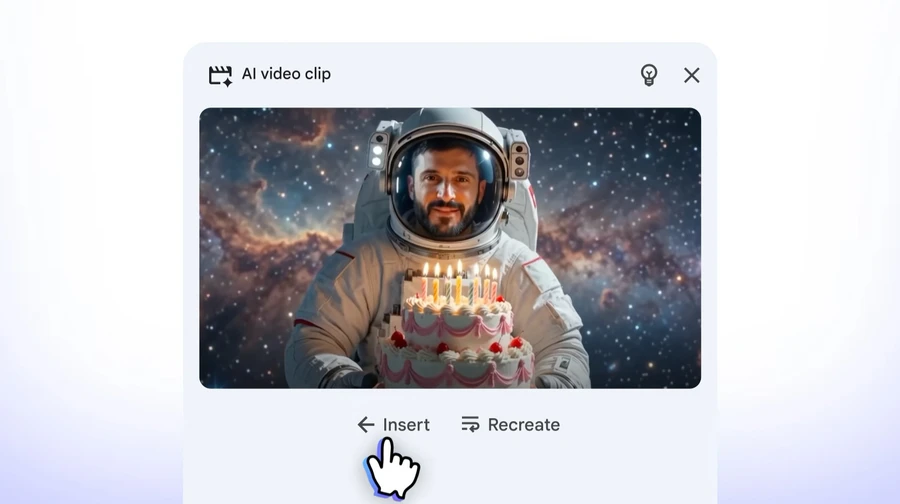
Google has announced a major update for Google Vids, bringing powerful AI video creation tools powered by Gemini Omni. The new features allow users to create a digital avatar of themselves, generate AI videos from text and images, and edit videos more naturally without restarting the entire project.
The update makes Google Vids more than just a presentation tool. It is now becoming a complete AI-powered video creation platform designed for businesses, educators, content creators, and professionals.
Create Your Own AI Avatar
One of the biggest additions is the ability to create a personal AI avatar.
Users can upload:
- A selfie
- A short voice recording
Google’s AI then creates a digital version of the user that looks and sounds similar to them. This avatar can be used in business presentations, training videos, announcements, and educational content without requiring users to appear on camera every time.
According to Google, these avatars are linked to the user’s Google account and include SynthID invisible watermarking to help identify AI-generated content.
For privacy and safety reasons, personal avatars are only available to eligible users aged 18 or older in supported regions.
Gemini Omni Makes Video Creation Easier
Google is also bringing its latest Gemini Omni AI model into Google Vids.
Instead of editing videos manually, users can now create videos simply by providing:
- A text prompt
- Reference images
Gemini Omni combines both inputs to generate a video automatically.
For example, users can ask AI to:
- Create a product presentation
- Generate marketing videos
- Produce training content
- Build educational explainers
- Turn images into animated stories
This significantly reduces the time needed for video production.
AI Video Editing Without Starting Over
Another useful improvement is step-by-step editing.
Previously, making major changes often required recreating the video. Now users can edit individual parts while keeping the rest of the project intact.
Google says users can also:
- Replace video backgrounds
- Improve lighting
- Add AI effects
- Enhance phone-recorded videos
- Make multiple edits during production
The new workflow makes video creation much more flexible.
Google Targets Business Video Creation
Although these tools can be used creatively, Google is positioning Google Vids mainly for workplace use.
Potential business applications include:
- Employee training videos
- Internal company announcements
- Product demonstrations
- Sales presentations
- Customer onboarding
- Educational tutorials
Because Google Vids is integrated with Google Workspace, organizations can create professional-looking videos without using expensive editing software.
Competition in AI Video Continues
The update also places Google Vids in direct competition with several AI video platforms, including:
- HeyGen
- Synthesia
- Captions
- D-ID
By combining AI avatars, text-to-video generation, and advanced editing into Workspace, Google is expanding its AI ecosystem for productivity users.
Read More on VitalStack
- Google AI Mode Now Works With Popular Apps
- OpenAI Launches a $70 ChatGPT Basketball and Fans Are Wondering Why
- Meta Introduces AI Safety Alerts for Parents When Teens Discuss Self-Harm
- Apple Opens AI-Powered Siri to Everyone with iOS 27 Public Beta
- Spotify Launches AI Music Assistant That Lets You Chat to Find the Perfect Song
Enjoyed this article?
Subscribe for weekly deep-dives on AI and health — straight to your inbox.