


Switching between different keyboard shortcuts during online meetings can be frustrating. Every video conferencing platform uses different keys for muting the microphone or turning off the camera, making it difficult to remember them during important conversations.
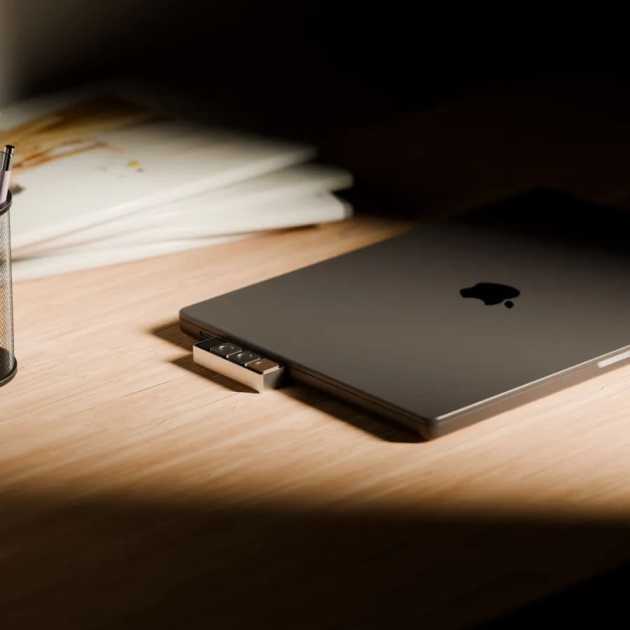
Project Mirage hopes to solve this problem with Dune, a compact three-button keypad designed specifically for MacBook users. The device plugs directly into the laptop and provides quick access to frequently used shortcuts across different applications.
Smart Buttons That Change with Every App
Unlike traditional macro keyboards, Dune automatically changes the function of its three buttons depending on which application is currently open.
For example:
- Zoom or Google Meet: Mute microphone, turn camera on or off, or bring the meeting window to the front.
- Microsoft Excel or Google Sheets: Copy, Paste, and Undo.
- Google Chrome: Refresh pages, open the address bar, or paste copied text.
- Visual Studio Code and GitHub: Merge pull requests, approve code reviews, or close requests.
This context-aware functionality removes the need to remember dozens of keyboard shortcuts.
Designed to Match Your MacBook
Project Mirage has designed Dune specifically for modern MacBooks.
The aluminum keypad connects through the USB-C port and sits flush against compatible laptops without leaving any gap. Since it draws power directly from the MacBook, users never have to charge it or replace batteries.
Currently, Dune supports:
- MacBook Air (M2 and newer)
- MacBook Pro (M1 Pro and newer)
- macOS Sequoia (macOS 15) or later
AI Helps Build Custom Shortcuts
One of Dune’s biggest highlights is its AI integration.
Using Claude Desktop, users can simply describe the shortcut they want in plain English. Claude automatically creates the required automation and assigns it to one of Dune’s buttons.
Examples include:
- Researching companies while browsing their websites
- Converting images into JPEG format
- Launching frequently used tools
- Automating repetitive office tasks
- Opening custom workflows with one click
Even users without programming knowledge can create advanced shortcuts.
Calendar Integration for Faster Meetings
The companion application also connects with your calendar.
Before your next meeting begins, Dune displays quick actions that allow you to:
- Join instantly
- Dismiss the reminder
- Send an “I’m running late” message
These features reduce interruptions and help users stay organized throughout the day.
Skills Marketplace Expands Possibilities
Project Mirage has also launched a Skills Marketplace, allowing users to download shortcuts created by the community.
Although the marketplace is still in its early stages, it has the potential to become a valuable resource for professionals looking to automate repetitive tasks without creating their own workflows.
A Few Limitations
While Dune offers impressive customization, there are still areas for improvement.
The keypad buttons are relatively easy to press accidentally, which could result in unintentionally muting or unmuting a meeting. The Skills Marketplace is also limited at launch, with only a small number of available automations.
Project Mirage is expected to expand both hardware refinements and software capabilities over time.
Why This Matters
AI-powered productivity tools are becoming increasingly common, but most remain software-only solutions.
Dune combines physical hardware with AI-powered automation, making everyday tasks faster and reducing the need to memorize complicated shortcuts. As professionals spend more time in virtual meetings and collaborative workspaces, devices like Dune could become valuable additions to modern workflows.
Read More on VitalStack
- Acti Launches AI Keyboard That Brings Smart AI Agents to Every App
- Clicks Unveils BlackBerry-Inspired Smartphone Ahead of Official Launch
- Sony to End Physical PlayStation Game Disc Production by 2028
- Pocket Raises $11 Million to Expand AI Note-Taking Device Business
- US Supreme Court Strengthens Digital Privacy, Limits Use of Geofence Warrants
Enjoyed this article?
Subscribe for weekly deep-dives on AI and health — straight to your inbox.