

Google has quietly introduced a major update to how people use Gemini AI. Instead of counting the number of prompts you send, Gemini now measures your usage based on the computing power each request requires.
The change means users may notice they reach their daily AI limits faster, especially when generating complex images, videos, code, or long AI conversations.
Google says the new system better reflects the actual computing resources needed to process different AI tasks.
What’s Changing?
Previously, Gemini usage was mostly limited by the number of requests you made.
Now, Google calculates AI usage based on:
- Complexity of your prompt
- Length of your request
- AI model being used
- Processing power required
- Features such as image or video generation
For example, asking Gemini for today’s weather uses very little AI capacity, while generating a long research report or creating an AI video consumes much more of your available usage.
Why Google Made This Change
According to Google, different AI requests require different amounts of computing resources.
Instead of giving every request the same value, the company now measures how much processing power each task actually uses.
This allows Google to manage its AI infrastructure more efficiently while offering access to increasingly powerful Gemini models.
Different Gemini Plans Offer Different Limits
Google now offers several Gemini subscription options:
Free Plan
- Standard AI usage
- Access to Gemini models with basic limits
AI Plus
- Around 2× more AI usage than the free plan
AI Pro
- Around 4× higher limits than the standard plan
- Larger context window
- Better support for advanced tasks
AI Ultra
- Highest AI usage limits
- Available in multiple pricing options
- Designed for professionals and heavy AI users
Google hasn’t published exact daily prompt numbers because usage now depends on how resource-intensive each request is.
AI Models Also Affect Your Usage
Gemini includes multiple AI models, including:
- Gemini Flash-Lite
- Gemini Flash
- Gemini Pro
The more advanced the model, the more AI credits it typically consumes.
Some models also include different reasoning modes such as:
- Standard
- Extended Thinking
- Deep Think
These modes improve response quality but require additional computing resources.
Context Window Matters Too
Google has also increased the amount of information Gemini can remember during a conversation depending on your subscription.
Approximate limits include:
| Plan | Context Window |
|---|---|
| Free | 32K tokens |
| AI Plus | 128K tokens |
| AI Pro | 1 Million tokens |
| AI Ultra | 1 Million tokens |
A larger context window allows Gemini to understand much longer conversations, documents, and projects.
How to Check Your Gemini Usage
Google makes it easy to see how much AI usage remains.
On Desktop
- Open Gemini.
- Click Settings.
- Select Usage Limits.
On Mobile
- Open the Gemini app.
- Tap the menu.
- Open Settings.
- Select Usage Limits.
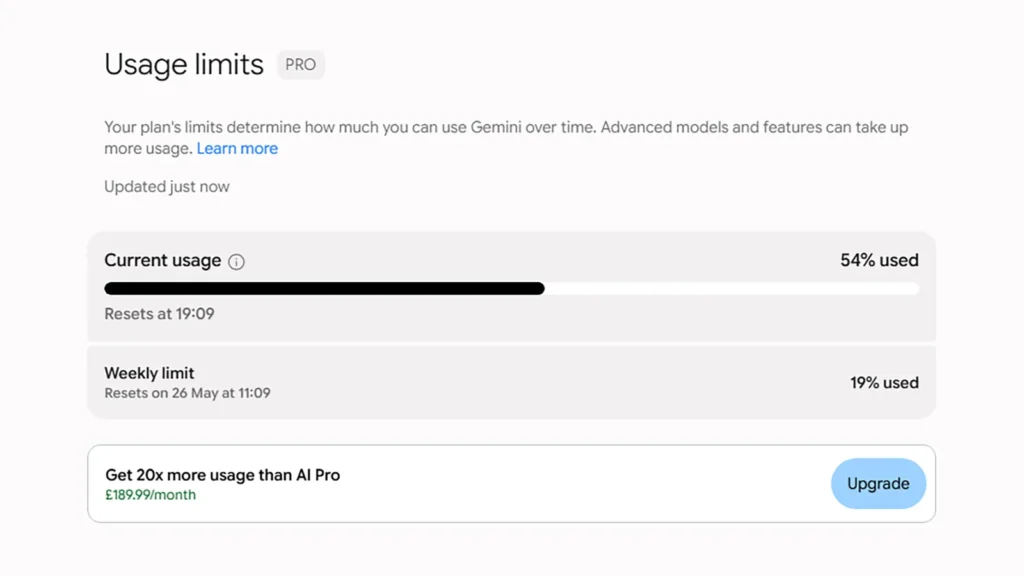
Users can view:
- Current usage
- Remaining AI credits
- Five-hour reset timer
- Weekly usage limit
If you exceed your limit, Gemini automatically switches to a lighter AI model until your usage resets.
What This Means for Everyday Users
The new system gives Google more flexibility in managing AI resources, but it may also make usage less predictable.
A few simple prompts may barely affect your limit, while creating AI videos, coding large applications, or generating detailed reports could consume significantly more credits.
Users who rely on Gemini for work or study may benefit from higher-tier subscriptions, while casual users can continue using the free version with standard limits.
Stay updated with the VitalStack.
Read More on VitalStack
- AWS and Bluesight Launch AI Tool to Simplify Hospital 340B Compliance
- AI Memory Chip Shortage Pushes Up Smartphone Prices in India
- China’s Kimi AI Model Sparks Global Debate Over Open-Source Artificial Intelligence
- Fake OpenAI AI Model on Hugging Face Delivered Malware to Thousands of Users
- Nokia Launchs AI-RAN Platform with NVIDIA to Boost 5G Network Performance
Enjoyed this article?
Subscribe for weekly deep-dives on AI and health — straight to your inbox.